Makko vs Unity: When AI Replaces Manual Game Development
Compares Makko and Unity to show how AI-native workflows replace manual setup during early game development.

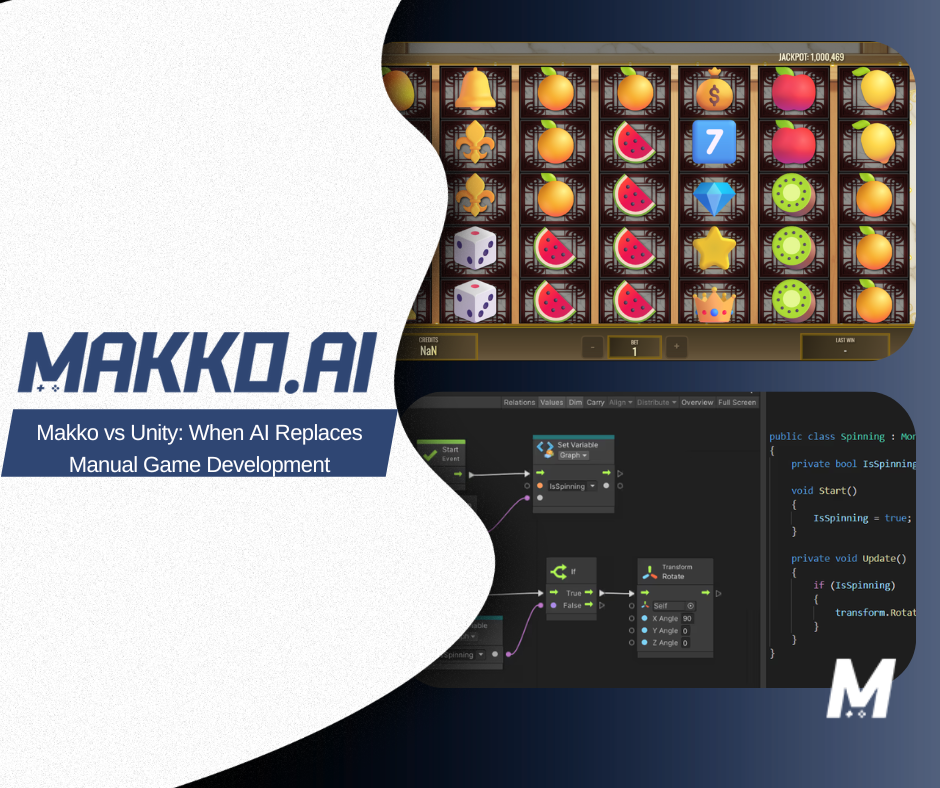
Makko and Unity can both produce playable games. That is where the similarity ends. They are built on different assumptions about who is building, what they need to control, and what the most valuable use of a creator's time looks like. Choosing between them is not a question of which is better in the abstract. It is a question of which is the right fit for your project, your background, and what you are trying to accomplish.
Unity is a traditional game engine built for manual implementation. It gives developers direct control over every system in a project: logic, physics, rendering, asset pipelines, platform targets. It expects them to exercise that control through code. Makko is an AI game development studio built for intent-driven game development. It expects creators to describe what they want their game to do, and handles the structural assembly through agentic AI.
This article gives you an honest comparison of both: what each is designed for, where each breaks down, how the workflows differ at every stage of development, and how to decide which one fits where you are right now. For definitions of terms used throughout, see the Makko AI Game Development Glossary.
What Unity Is Actually Built For
Unity is one of the most widely used game engines in the world, and it earned that position for good reasons. It is a mature, production-tested platform with deep tooling for 2D and 3D development, a large ecosystem of assets and plugins, strong cross-platform export capabilities, and a developer community that has produced more tutorials, Stack Overflow threads, and published games than almost any other engine.
At its core, Unity is a manual implementation environment. It assumes the person using it will write C# scripts to define game logic, configure systems through the inspector or code, manage state machines and animation controllers, handle asset imports and pipeline settings, and wire together the dependencies between systems explicitly. This model gives developers a high degree of control: if you know what you want and how to implement it, Unity gives you the tools to do exactly that at whatever level of precision the project requires.
The tradeoff is overhead. Unity's depth is also its setup cost. Getting a new project from blank scene to first playable mechanic involves navigating the accumulation of engine configuration, asset setup, script wiring, and system initialization that precedes any actual game design work. For experienced developers who know the engine well, this overhead is manageable and often familiar. For solo creators, designers without a coding background, or anyone building under time pressure, it is a meaningful barrier to entry that compounds with every new mechanic added to the project.
Unity is designed for teams building production-scale games over extended development cycles: projects where the investment in setup and infrastructure pays off across a long runway of development, and where dedicated engineering resources can absorb the technical overhead while designers focus on creative decisions.
What Makko Is Actually Built For
Makko is not a game engine in the traditional sense. It does not ask developers to write scripts, configure physics layers, or wire asset dependencies manually. It operates as an AI-native environment where creators describe the game they want to build: its mechanics, rules, visual style, behaviors, and progression. The AI handles structural assembly.
The technical foundation of this approach is system orchestration: rather than requiring a creator to manually connect every system to every other system, Makko's AI maintains a live understanding of the project's current state and ensures that when something changes, dependent systems update consistently. This is what prevents the state drift that accumulates in manually scripted projects, the growing fragility that makes each new change riskier than the last.
The workflow is built around conversational game design. A creator opens a project, describes what they want: a mechanic, a system, a visual change, a behavioral rule. The AI interprets that intent, performs task decomposition, and assembles an implementation. The result is a workflow where the distance between idea and testable build is measured in minutes rather than days.
Makko is designed for creators who want to focus on what their game does and how it feels, not on the implementation details that make it run. This includes solo developers who cannot afford to spend the first several days of a project on setup, first-time creators who have a game to make but have not built the technical infrastructure to implement it manually, designers and artists from adjacent fields who understand games deeply but do not write code, and experienced developers who want to prototype and validate ideas quickly before committing to a full production pipeline.
The Core Difference: Where Decisions Are Made
The most precise way to describe the difference between Makko and Unity is this: in Unity, developers decide how systems are implemented. In Makko, creators decide what the game should do, and the AI determines how to assemble the systems.
In Unity, a creator who wants to add regenerating health to their game needs to modify the health script, update the UI binding, adjust the save system, and ensure no existing enemy behavior breaks when health values change mid-session. In Makko, the same creator describes "health should regenerate slowly over time after the player has not taken damage for a few seconds" and the AI identifies the affected systems, updates them consistently, and maintains state awareness across the change.
Neither approach is categorically superior. The Unity approach gives the developer precise control over every detail of the implementation, which matters when the specifics of how something works have downstream performance or compatibility implications. The Makko approach gives the creator speed and consistency, which matters when the priority is exploring whether a mechanic is actually fun before investing in its optimization.
The practical implication is that these tools serve different moments in the development lifecycle. Unity is optimized for building things that are already well-defined. Makko is optimized for figuring out what to build: the discovery and validation phase where most game design actually happens, and where the cost of manual implementation most often kills creative momentum.
Makko vs Unity: A Full Workflow Comparison
The differences between these two tools are not confined to setup. They show up at every stage of the development process. The table below maps both approaches across the full arc of building a game, from first concept to published build.
| Stage | Unity | Makko |
|---|---|---|
| Project setup | Engine install, project configuration, folder structure, SDK linking, initial scene setup: all manual before any game logic runs | Describe the game concept; system orchestration assembles the project structure automatically |
| Implementing a mechanic | Write C# scripts, configure physics interactions, wire input events, manage state flags: implementation knowledge required for every new feature | Describe the mechanic; AI handles implementation and wires it to existing systems |
| Asset creation | Source or commission assets externally; import and configure manually; align anchor points; set up animator controllers | Art Studio generates game-ready characters, props, and environments; Collections maintains consistent visual style across the project |
| Animation system | Build animator state machine, define transitions, align frames manually to prevent jitter, write transition conditions in code | AI generates and stabilizes animation states; alignment handled through the Alignment Tool in the manifest system |
| Game state management | Manually maintain variable references across scripts; risk of state drift grows as project complexity increases | State awareness maintained automatically; changes propagate consistently to dependent systems |
| Iteration and debugging | Trace bugs manually through interconnected scripts; refactor affected systems; retest for regressions | Describe what went wrong; AI diagnoses and fixes; changes remain state-consistent across the project |
| Publishing | Configure build targets per platform; manage export settings; package and distribute manually | Publish to browser with one action; shareable link generated immediately |
| Learning curve | Steep: requires learning C#, Unity-specific APIs, editor workflows, and project architecture before productive development begins | Minimal: productive from the first session; no syntax prerequisite |
| Best suited for | Production-scale games with dedicated engineering teams, long development cycles, and requirements that need low-level engine control | Solo developers, first-time creators, designers without a coding background, and anyone prioritizing speed of validation over depth of control |
Where Unity Has a Genuine Advantage
A fair comparison requires being direct about where Unity is the stronger tool, not just where Makko improves on it.
Unity's most durable advantage is depth of low-level control. For projects that require highly optimized rendering, custom physics behavior, complex multiplayer networking, or platform-specific integrations that go beyond what an AI-native workflow currently abstracts, direct engine access matters. A developer building a large open-world game with dynamic lighting, physics-driven destruction, and server-authoritative multiplayer needs the kind of fine-grained control that only direct engine programming provides. Unity, with its mature tooling and established ecosystem, is still the right environment for that work.
Unity also has a significant advantage in team scale. Its version control integration, prefab system, scene management, and established team workflows are built for multi-person development over extended timelines. When a project has dedicated programmers, artists, designers, and QA working in parallel, Unity's structure supports that coordination in ways that are difficult to replicate in a creator-focused AI-native tool.
The ecosystem is a third genuine advantage. Fifteen years of community development has produced an enormous library of assets, plugins, tutorials, and documented solutions to nearly every common game development problem. For developers who encounter a technical problem, the probability that someone has already solved it and published the solution is very high. That institutional knowledge has real value for teams navigating complex production challenges.
None of this makes Unity the right choice for every project. But for production-scale games with the team and timeline to use it properly, it remains a serious tool with serious capabilities that an AI-native platform is not trying to replicate.
Where Makko Has a Genuine Advantage
Makko's clearest advantage is in the early and middle phases of development: the periods where most game projects fail, and where the cost of manual implementation is highest relative to the creative value it produces.
The first advantage is speed of validation. AI-assisted game prototyping compresses the time between idea and first playable build significantly. In a Unity workflow, reaching a playable version of a new game concept requires clearing the full setup overhead before any design can be tested. In Makko, a creator can describe a core loop and have something testable within a session. For the large proportion of game development where the primary question is "is this actually fun," this speed advantage is decisive.
The second advantage is iteration safety. Because state awareness is maintained automatically, changes to a project do not accumulate the fragility that manually scripted projects develop over time. A creator can keep refining and redirecting a game throughout its development without the growing risk of cascading regressions that eventually stalls Unity projects that were not architecturally planned for flexibility from the start.
The third advantage is accessibility. Designers, writers, artists, and domain experts who have game ideas worth building are no longer blocked by a programming prerequisite. The barrier to starting is as low as being able to describe what you want.
The fourth advantage is publishing friction. Unity's build pipeline adds a meaningful last-mile cost between a finished game and one that is accessible to others. Makko's browser-native publishing generates a shareable game link immediately, which means sharing a build with playtesters happens in seconds rather than after a manual export process. In a development workflow where feedback speed matters, that difference compounds over multiple iterations.
The Prototype-to-Production Pipeline
One of the most practical ways to think about the Makko vs Unity question is as a pipeline rather than a binary choice. Many teams find that the two tools serve different phases of the same project rather than competing for the same role.
The validation phase, figuring out what the game is, what the core loop feels like, whether the mechanics are engaging, is where Makko's speed and accessibility matter most. A team that uses Makko to build and test multiple versions of a core loop can arrive at a validated concept much faster than a team that commits to a Unity implementation before they know if the idea works.
Once a concept is validated and a team is ready to invest in production-scale development: larger worlds, more complex systems, multiplayer, platform-specific optimization. A transition to Unity becomes a considered decision rather than a default. The game has been tested, the design has been refined, and the team knows what they are building before they commit to building it at scale.
This pipeline approach is particularly relevant for solo developers who are exploring multiple concepts simultaneously. Rather than investing weeks in Unity setup for an idea that might not pan out, a solo creator can use Makko to quickly test several directions, identify the one with the most promise, and then make an informed decision about whether that concept warrants a full production commitment.
For game jam contexts, Makko's advantage is particularly pronounced. The time constraints of a jam, typically 24 to 72 hours, make setup overhead a critical problem. Hours spent on configuration in Unity are hours not available for design refinement and playtesting. An intent-driven workflow removes that tradeoff almost entirely.
How to Decide: A Practical Framework
The right tool depends on where you are in development, what your project requires, and what kind of work you want to spend your time on.
Choose Makko if: you are in the validation or early design phase of a project; you want to reach a playable build quickly without clearing setup overhead first; you are building solo or in a small team without dedicated engineering resources; you are a designer, artist, or creator from an adjacent field who does not write code; you are participating in a game jam or working under significant time pressure; you want to prototype multiple concepts and test which one is worth pursuing further; or you care more about whether the game is fun than about how the underlying systems are implemented.
Choose Unity if: you are building a production-scale game with a long development timeline and dedicated engineering resources; your project requires deep low-level control over rendering, physics, or platform-specific behavior; you are working on a large team that needs Unity's established collaboration and version control workflows; or you have a fully defined game design and are ready to commit to a formal production pipeline rather than continuing to explore and validate.
Consider both if: you want to use Makko to validate and refine your concept quickly, then evaluate whether the project warrants a transition to Unity for full production. This staged approach lets you make the Unity investment with confidence, after the design is proven rather than before.
The Question Is What You Are Optimizing For
Makko and Unity are not competing for the same thing. Unity optimizes for control and production depth. Makko optimizes for speed of creative validation and accessibility. The creator who benefits most from Unity is one who knows exactly what they are building, has the technical skills to build it, and has the time and team to absorb the overhead. The creator who benefits most from Makko is one who has a game they want to make and wants as little as possible standing between them and finding out if it works.
For the large majority of indie creators, people who got into game development because they had an idea rather than because they wanted to become engine engineers, that second description is the more accurate one. The implementation-intent gap has historically been the reason most of those ideas never became games. Makko exists to close it.
Frequently Asked Questions
Is Makko a replacement for Unity?
No. Makko and Unity are not competing for the same role in development. Unity is optimized for production-scale games with dedicated engineering teams and long development cycles. Makko is optimized for the validation and early design phase: reaching a playable build quickly, iterating without writing code, and testing whether a concept is worth building before committing engineering resources to it. Many teams use Makko to validate and refine a concept before transitioning to Unity for full production.
What is the main difference between Makko and Unity?
In Unity, developers decide how systems are implemented. In Makko, creators describe what the game should do and the agentic AI determines how to assemble the systems. Unity is implementation-driven: every system exists because a developer explicitly built it. Makko is intent-driven: the creator defines outcomes and the AI handles the structural assembly, maintaining state awareness across the full project.
When should I use Makko instead of Unity?
Use Makko when you are in the validation or early design phase, when you want to reach a playable build without clearing setup overhead first, when you are building solo or without dedicated engineering resources, when you are a designer or artist without a coding background, or when you are participating in a game jam. Makko is also the right starting point when you want to prototype multiple concepts quickly before committing to a full production build.
When is Unity the better choice?
Unity is the better choice when your project requires deep low-level control over rendering, physics, or platform-specific behavior; when you are shipping a large-scale game with dedicated engineering resources and a long production timeline; when you need complex multiplayer infrastructure; or when you are working on a large team that needs Unity's established collaboration and version control workflows.
Can I use both Makko and Unity on the same project?
Yes. Many teams use Makko to validate and refine the core game concept quickly, then transition to Unity for full production once the design is proven. This staged approach lets you make the Unity investment with confidence, after the design has been tested rather than before. The two tools serve different phases of the same development lifecycle rather than competing for the same role.
For detailed walkthroughs and live feature demos, visit the Makko YouTube channel.